# Cloud4.ai Documentation

Welcome to Cloud4.ai Documentation!

## Introduction

***

Cloud4.ai is not just a cloud; it's a Platform as a Service (PaaS) designed to empower developers and businesses. C4AI offers a **suite of**[ **managed services**](/services/general-information)**, simplifying the development of AI applications** and streamlining integrations with third-party AI services.&#x20;

The overarching goal of Cloud4.ai is to provide a centralized solution, offering control over numerous integrations, centralized reporting, and a collection of building blocks adaptable for diverse AI applications.

<figure><img src="https://3514947572-files.gitbook.io/~/files/v0/b/gitbook-x-prod.appspot.com/o/spaces%2FA3AV7RUHbrtjhaHwYVxQ%2Fuploads%2F2Sj9XcYwGDp2zVuH52rg%2Fimage.png?alt=media&amp;token=e619ac0e-b78b-4d0f-b6ae-9f780ec6d3d1" alt=""><figcaption></figcaption></figure>

At the core of C4AI architecture is the principle that **Cloud4.ai serves as a mediator, allowing your application to seamlessly connect with various modern AI solutions**. This eliminates the need for extensive customization of your processes, APIs, or in-house systems. Additionally, Cloud4.ai provides collaborative tools to enhance service management and elevate the quality of AI generation, contributing to the improvement of your overall solution.

## Resources &#x20;

***

* 🔗 [LinkedIn](https://www.linkedin.com/company/cloud4-ai)&#x20;
* ⚙️ [Github](https://github.com/cloud4-ai)
* 🚀 Youtube with **quick guides**
* 💬 [Discord](https://discord.gg/tcHqG4Nc)

## Developers

***

Developed by the in-house [ADAAS](https://adaas.org) R\&D team and backed by private investments from [ADAAS](https://adaas.org), [Cloud4.ai](https://cloud4.ai) aims to revolutionize the AI landscape by offering a versatile and collaborative platform.&#x20;

* [ADAAS](https://adaas.org)
* [prst.ai](https://prst.ai)

<figure><img src="https://3514947572-files.gitbook.io/~/files/v0/b/gitbook-x-prod.appspot.com/o/spaces%2FA3AV7RUHbrtjhaHwYVxQ%2Fuploads%2F5lwGS29YYCmcbzagP3QO%2Flogos-prst-c4-adaas.png?alt=media&amp;token=042c8749-510d-4dd7-a28e-d8d2d0066c75" alt="" width="375"><figcaption></figcaption></figure>

This documentation serves as your comprehensive guide to navigating and leveraging the full potential of [Cloud4.ai](https://cloud4.ai). Whether you are a developer, AI enthusiast, or business professional, dive into the documentation to explore the functionalities, integrations, and possibilities that C4AI brings to your AI endeavors.


# Overview

## About Cloud4.ai

***

Cloud4.ai is the ultimate framework for businesses, serving as your personal AI department. It's a powerful tool designed to reduce product total cost of ownership (TCO) by providing an AI serverless framework. With Cloud4.ai, organizations can access a comprehensive suite of AI tools and services without the need for extensive infrastructure or dedicated personnel. This platform empowers businesses to leverage advanced AI capabilities seamlessly, driving innovation, efficiency, and cost savings across their operations.

<figure><img src="https://3514947572-files.gitbook.io/~/files/v0/b/gitbook-x-prod.appspot.com/o/spaces%2FA3AV7RUHbrtjhaHwYVxQ%2Fuploads%2Fy27pMrB9t8gDl1IRho33%2Fimage.png?alt=media&amp;token=ec9e29b0-8264-4608-800e-31e7934bdf04" alt="" width="563"><figcaption></figcaption></figure>

## Problem&#x20;

***

Cloud4.ai strives to bridge the gap in knowledge between ML Engineers and Developers, making AI more accessible to everyone. We aim to provide a straightforward approach to integrating AI into the application development lifecycle, simplifying integration setup, AI management, and research processes.&#x20;

**Our goal is to minimize AI integration risks and facilitate a smoother transition into AI adoption.**

The C4AI Team is dedicated to research and development, aiming to function as an AI Research department. We aspire to offer an easy way to test, integrate, and select appropriate AI tools, enabling businesses to embark on their AI journey with greater speed and ease.

## Services

***

Cloud4.ai offers a diverse range of services that form the foundation for executing various processes. These services are grouped based on their usage principles, catering to different needs within AI applications.

> 💡 **Note:** Read more in [Services Section](#services)

With Cloud4.ai services, you can significantly streamline tasks such as model selection, data migration, and integration with cutting-edge technologies. Our services serve as your primary gateway into the realm of AI, offering efficient solutions to accelerate your journey in the AI landscape.

## SDKs

***

Cloud4.ai offers a range of native SDKs for seamless integration with its services. Available SDKs include:

* [JavaScript / TypeScript / Node.](https://github.com/cloud4-ai/c4ai-sdk-node)js
* [Java](https://github.com/cloud4-ai/c4ai-sdk-java)
* [Python](https://github.com/cloud4-ai/c4ai-sdk-python)
* [Go](https://github.com/cloud4-ai/c4ai-sdk-go)

These SDKs provide developers with comprehensive toolsets to leverage Cloud4.ai's capabilities within their preferred programming languages.


# Security

## **Data Storing**

***

At Cloud4.ai, we prioritize the security and confidentiality of your data. We employ stringent measures to ensure that sensitive information remains protected at all times. C4AI does not store any credentials or data in an unencrypted format.&#x20;

> 🔐 **Note:**  All credentials are decrypted only during execution, minimizing the risk of unauthorized access.

## **Network Security**

***

Cloud4.ai adheres to industry-leading security practices, leveraging the robust infrastructure of AWS (Amazon Web Services). We implement AWS security best practices to safeguard your data throughout its lifecycle. This includes limiting access to ports, encrypting data during transfer, and implementing comprehensive network security protocols.

## **Logging Policies**

***

Protecting your privacy and confidentiality is paramount to us. C4AI does not log any credentials provided or stored within our system. This ensures that sensitive information remains inaccessible to unauthorized parties and minimizes the risk of data exposure.

## **Encryption Keys**

***

We prioritize data encryption as a fundamental aspect of our security framework. Each organization within Cloud4.ai is allocated unique encryption keys, ensuring the isolation and protection of data.&#x20;

> 🔐 **Note:**  Additionally, unique encryption keys are assigned to each record, further enhancing data security and confidentiality.

## **Security Practices**

***

Cloud4.ai adheres to the highest security standards and best practices to ensure the integrity of your data. We utilize Advanced Encryption Standard (AES) with a 256-bit key length, enhancing encryption strength and resilience. In some cases, we employ 512-bit key length encryption for even greater security measures.&#x20;

> 🔐 **Note:**  Users are provided with the flexibility to choose their preferred method of credentials passing, ensuring compatibility with diverse security requirements. Read More: [CSS Best Practices](/services/css-credentials-store/best-practices)

## **Data Removal**

***

We understand the importance of data privacy and compliance. Cloud4.ai provides mechanisms for data removal upon request, enabling users to maintain control over their data and ensuring compliance with relevant regulations and policies.


# Pricing

## Introduction

***

Welcome to Cloud4.ai's Pricing Terms of Service. Here, we outline our **pay-as-you-go pricing structure**, complete with budget planning and reporting functionalities.&#x20;

## Pricing Strategy&#x20;

***

Each service within the Cloud4.ai system features unique pricing models, tailored to configurations, resource consumption, and actual usage.

> ❗️**Note:**  Cloud4.ai continuously work on price reduction. Because of that the service price may be updated depending on the system load, users behaviors, requirements and infrastructure costs.

### **Commands Price**

Cloud4.ai operates on a command-based framework, where all interactions are channeled through commands. Consequently, services like [AAC (AI API Cconnector)](/services/aac-ai-api-connector) or [KDB (Knowledge Database)](/services/kdb-knowledgebase) offer pricing based on consumption. The system calculates expenditures at least daily, potentially continuously, depending on usage patterns. Following this, the system automatically updates the user's balance and deducts the required amount.&#x20;

> ❗️**Note:**  In cases of unpredictable load, the system may verify the user's balance before execution to ensure sufficient credits are available.

<figure><img src="https://3514947572-files.gitbook.io/~/files/v0/b/gitbook-x-prod.appspot.com/o/spaces%2FA3AV7RUHbrtjhaHwYVxQ%2Fuploads%2FNcTMxoB4afwPtGYVsR1L%2Fimage.png?alt=media&amp;token=a4845dd9-4ce8-4b8a-9d72-6b0c1b2ef8ea" alt=""><figcaption></figcaption></figure>

### **Monthly Price**

Certain services require a **fixed fee upon creation**. This fee is calculated based on the service's creation date. Actively used hours determine service activity and pricing. Therefore, depending on the date within the month, the system automatically calculates the number of hours until the end of the month and reserves the required amount from the user's balance.

> ❗️**Note:**  The amount shown in C4AI Cloud Console represents the whole months price. Because of that the actual amount to withdraw from balance can be lower.

<figure><img src="https://3514947572-files.gitbook.io/~/files/v0/b/gitbook-x-prod.appspot.com/o/spaces%2FA3AV7RUHbrtjhaHwYVxQ%2Fuploads%2FagibENJYgRGREUZCgwhP%2Fimage.png?alt=media&amp;token=387a6a60-e8d0-4bd7-b4b1-d693003dca5d" alt=""><figcaption></figcaption></figure>

## Terminology

***

### **Credits**

Credits represent monetary value equivalent to US Dollars paid and can be utilized across all Cloud4.ai services without expiration. Credits can be topped up via the balance section in the Cloud4.ai Cloud Console.&#x20;

> ❗️**Note:**  Only the [Root User (Management Account)](/concept/organization-structure#root-user-management-account) possesses permissions for balance operations.

### **User Balance**

User balance denotes available credits for spending across services. Upon service creation, the system holds a required amount until the end of the paid period (End of Month) and automatically extends service activity.

### **User Card Information**

**Cloud4.ai refrains from storing any card information, billing data, or associated user data.** Financial transactions are conducted externally, with the system solely managing user balance. Upon purchasing a product, which essentially adds to the user balance, the selected amount is seamlessly transferred.&#x20;

> ❗️**Note:**  Payments resulting in successful balance transfers are non-refundable and irreversible.

### **Promo Codes**

Cloud4.ai offers personalized promo codes to enhance your C4AI experience. Promo codes are exclusive and can only be redeemed once. They provide extra credits to the user balance without any real charges. These credits are equivalent to others in the system, have no expiration date, and are compatible with all Cloud4.ai services.

### **Reporting**

Our reporting feature enables users to access consumption reports categorized by service and project. With this functionality, users can make informed decisions based on their preferences and usage patterns.

<figure><img src="https://3514947572-files.gitbook.io/~/files/v0/b/gitbook-x-prod.appspot.com/o/spaces%2FA3AV7RUHbrtjhaHwYVxQ%2Fuploads%2F6yOuOSa2p8GPa52IhfOm%2Fimage.png?alt=media&amp;token=b568deb2-0bc8-4e5f-8633-59989e0523f1" alt=""><figcaption></figcaption></figure>


# Commission to Model Developers

Cloud4.ai presents an exciting opportunity for model developers to showcase their unique solutions and collaborate with our team to make them available for public usage. If you have a groundbreaking solution that could benefit a wide range of users, we're eager to work with you to prepare it for public release.

By partnering with us, you not only gain access to our platform but also benefit from our expertise and resources to refine and optimize your model for maximum impact. Additionally, we provide insights into market trends, helping you stay aligned with the evolving needs of users and businesses.

<figure><img src="https://3514947572-files.gitbook.io/~/files/v0/b/gitbook-x-prod.appspot.com/o/spaces%2FA3AV7RUHbrtjhaHwYVxQ%2Fuploads%2FL1qAY7x2j1dCpQ4gcOtw%2Fimage.png?alt=media&amp;token=f08cd3fc-c7a8-485a-8161-a64e93290038" alt=""><figcaption></figcaption></figure>

Whether you're an experienced developer or just starting out, Cloud4.ai offers a supportive environment where your ideas can thrive and make a real difference. Join us in shaping the future of AI solutions and contribute to our mission of driving innovation and progress in the industry.


# Backlog

{% embed url="<https://trello.com/b/203RQipl/cloud4ai-backlog>" %}


# Enterprise

## Self-Hosted Version

***

Cloud4.ai offers enterprises an unparalleled solution for the seamless integration of AI into their business processes. Our self-hosted version of C4AI provides enterprises with the tools they need to make a significant impact on internal development.&#x20;

**Contact us to learn more about pricing and relevant information tailored to your enterprise's needs.**

The Enterprise version of Cloud4.ai provides a comprehensive solution for secure data management, efficient budget management, and accelerated AI application development. With a robust set of AI Managed Services, enterprises can streamline their workflows and drive innovation within their organizations.

Moreover, our Enterprise solution offers integrations with top-rated solutions from Microsoft, AWS, Google, and more. These integrations empower enterprises with advanced capabilities for user management, security best practices, and additional features to enhance their AI initiatives. Partner with Cloud4.ai to unlock the full potential of AI within your enterprise and stay ahead in today's competitive landscape.

## Migrate to Self Hosted

***

The enterprise version of Cloud4.ai offers the capability to migrate data seamlessly between cloud-based and self-hosted environments using [**.cc4 files**](/concept/.cc4). This internal standard simplifies batch processing and serves as a temporary storage solution for various data types and formats within the system. By leveraging `.cc4` files, enterprises can efficiently manage their data, transfer it between environments, and ensure consistency and accessibility across different deployment scenarios.&#x20;

> 💡 **Note:**  Read More about the migration options in [.cc4 Section](/concept/.cc4#migration)&#x20;

This feature enhances data portability, enabling organizations to maintain control over their data while benefiting from the flexibility and scalability of Cloud4.ai's AI Managed Services.

## PRST.ai

***

**link:** [**https://prst.ai**](https://prst.ai)

In addition to our comprehensive Enterprise solution, Cloud4.ai also offers a more streamlined solution for prompt management with prst.ai. Designed to meet the specific needs of prompt management, prst.ai provides a range of features including feedback collection, prompt management, access control, and more.

With prst.ai, users can easily manage prompts, gather valuable feedback from users, and maintain control over access to prompt-related resources. Whether you're a small team or a large enterprise, prst.ai can be tailored to your specific requirements, providing a simple yet powerful solution for prompt management.

Contact us to learn more about prst.ai and how it can enhance your prompt management processes, streamline workflows, and drive innovation within your organization.


# Quick Start

Cloud4.ai (C4AI) SDK Quick Start Guide

## Introduction

***

Welcome to the Cloud4.ai (C4AI) SDK Quick Start guide! This guide will walk you through the setup process and provide examples for using the C4AI SDK.\
\
The SDK provides a comprehensive set of functionality to communicate with C4AI managed Services using Object-Oriented Programming (OOP) style. Leveraging entities and the request structure, you can construct complex pipelines for parameter injection, service execution, and AI management with ease.

The SDK is built on the Command concept. To make requests to the system, you need to create a command object and pass it through the universal entry point under the EES service. This quickstart guide offers simple examples of execution and request structure. For more details, explore each service directly.

> &#x20;**Note:**  For further details, explore each service directly.&#x20;

## Installation

***

To get started, you need to install the C4AI SDK package. You can install it via npm:

```bash
npm install @c4ai/sdk-node
```

## Authentication

***

Before using the SDK, you need to authenticate your application.

> To locate your credentials, visit the following link: [API Credentials](https://console.cloud4.ai/organization?tab=api-credentials) or learn more about setting up organization and credentials: [Organization Structure](/concept/organization-structure#api-credentials)

In a basic scenario, you can provide credentials via environment variables. To load them, you can utilize packages like dotenv ([dotenv](https://www.npmjs.com/package/dotenv/v/14.0.0)) or similar. Regardless of the approach used to provide credentials, the SDK will automatically authenticate during the execution of actual commands.

```javascript
import { C4AI_SDK_Context } from "@c4ai/sdk-node";

const C4AI_CLIENT_ID = process.env.C4AI_CLIENT_ID!;
const C4AI_CLIENT_SECRET = process.env.C4AI_CLIENT_SECRET!;

C4AI_SDK_Context.setCredentials(
    C4AI_CLIENT_ID,
    C4AI_CLIENT_SECRET
);
```

> **Note:** For more information on SDK configurations and authentication approaches, refer to the section: [Authentication](/sdk/authentication)

## Usage Example

***

Here's a simple example of usage using Elastic Endpoint (EES) and AI API Connector (AAC):

```javascript
import { config } from 'dotenv';
config();
import {
    C4AI_AAC,
    C4AI_EES,
    C4AI_EES_ExecutionOptions,
    C4AI_RequestParameter,
    C4AI_RequestParameters,
    C4AI_SDK_TYPES__EES_ExecutionPriority
} from 'c4ai-node';

(async () => {
    const eesSic = "sic@0000000001:ees:0000000001";
    const aacSic = "sic@0000000001:aac-instance:0000000001";

    const command = new C4AI_EES.Commands.EXECUTE({
        service: new C4AI_EES(eesSic),
        command: new C4AI_AAC.Commands.EXECUTE({
            service: new C4AI_AAC(aacSic),
            parameters: new C4AI_RequestParameters(
                new C4AI_RequestParameter('system_role', 'You\'re a friendly giraffe!'),
                new C4AI_RequestParameter('user_input', 'How long is your neck?'),
            )
        }),
        options: new C4AI_EES_ExecutionOptions({
            priority: C4AI_SDK_TYPES__EES_ExecutionPriority.INSTANT
        })
    });

    const response = await command.execute();

    console.log(response)
})();
```

That's it! You're now ready to start using the Cloud4.ai SDK in your applications.


# Authentication

## **Introduction**

C4AI SDK provides several ways to pass credentials and configurations:

* Directly through context
* Using the C4AI Config File
* Using Environment Variables

Each case may be useful for specific scenarios depending on your application architecture.

## **Priority**

In some cases, it's possible to combine several approaches to SDK configuration. For these scenarios, the priority of configurations should be taken into account. The standard priority is the same as above&#x20;

Direct -> `c4ai.conf.json` -> Env Variables

### **Direct Credentials**&#x20;

This approach has the highest priority, and other credentials will be overwritten by the provided ones.

*Example:*

```javascript
import { C4AI_SDK_Context } from "@c4ai-sdk/global/C4AISDKContext.class";

C4AI_SDK_Context.setCredentials(
    "C4AI--client::769e...YOUR_CREDS....04bc161",
    "C4AI--secret::5ca62...YOUR_CREDS....99249dab36bf4db"
);

/**
 * Not mandatory in real requests. 
 * Will authenticate automatically during request
 */
await C4AI_SDK_Context.authenticate();
```

### **Config File**&#x20;

Another way to pass credentials and configurations is via the `c4ai.conf.json` file.&#x20;

> &#x20;**Note:** *Read more in the* [Configurations & Env Variables](/sdk/configurations-and-env-variables#c4ai-config-file) *section.*&#x20;

In case credentials have not been passed directly, the SDK will use credentials from the file in the project root folder.

**Example:**

```bash
# Create the c4ai.conf.json file
touch c4ai.conf.json
```

```json
// Edit c4ai.conf.json and set credentials
{
    "client_id": "YOUR_CLIENT_ID", // mandatory
    "client_secret": "YOUR_CLIENT_SECRET" // mandatory
}
```

&#x20;Then authentication will be done automatically during the request execution.

### **Environment Variables**&#x20;

This is the most secure and recommended way to pass your credentials to the SDK. However, it will only be used if the configuration file `c4ai.conf.json` and direct credentials have not been provided.

**Example:**&#x20;

```bash
# Create the .env file
touch .env
```

```dotenv
# Add mandatory variables to .env
C4AI_CLIENT_ID=C4AI--client::769e...YOUR_CREDS....04bc161
C4AI_CLIENT_SECRET=C4AI--secret::5ca62...YOUR_CREDS....99249dab36bf4db
```

Then authenticate:

```javascript
import { config } from 'dotenv';
config(); // just for example
import { C4AI_SDK_Context } from "@c4ai-sdk/global/C4AISDKContext.class";

/**
 * Not mandatory in real requests. 
 * Will authenticate automatically during request
 */
await C4AI_SDK_Context.authenticate(); 
```

> &#x20;**Note:** *Do not forget to include the `.env` file in `.gitignore` to prevent credentials from being pushed to the repository.*


# Configurations & Env Variables

## Introduction

To configure, test, and authenticate the C4AI SDK, environment variables are utilized. These variables enable the configuration of logging behavior, authentication, and other parameters crucial for debugging and development purposes.

## Environment Variables

### Mandatory

Mandatory environment variables are required for the SDK authentication process. If you're passing credentials directly or via the `c4ai.conf.json` file, these environment variables will be used in accordance with their priority.

> &#x20;**Note:**  Read more about credentials and configuration priority in the [Authentication](/sdk/authentication) section.&#x20;

| Variable             | Description                                |
| -------------------- | ------------------------------------------ |
| C4AI\_CLIENT\_ID     | Client ID for Cloud4.ai authentication     |
| C4AI\_CLIENT\_SECRET | Client secret for Cloud4.ai authentication |

### Configurable for Development

Using development parameters, you can configure the SDK behavior more effectively for debugging and testing purposes.

<table><thead><tr><th width="372">Variable</th><th width="143">Default Value</th><th>Description</th></tr></thead><tbody><tr><td>C4AI_SDK_CONFIG_VERBOSE</td><td></td><td>Enable verbose logging (true/false)</td></tr><tr><td>C4AI_SDK_CONFIG_IGNORE_ERRORS</td><td>true</td><td>Ignore errors during SDK execution (true/false)</td></tr><tr><td>C4AI_SDK_CONFIG_SDK_VALIDATION</td><td>true</td><td>Enable SDK validation (true/false)</td></tr></tbody></table>

### Configurable for Testing

If you need to run tests, you can additionally configure test environment variables, which can facilitate running tests directly on your services.

> &#x20;**Note:** `C4AI_SDK_API_LOCATION` may also be utilized in the case of a standalone Cloud4.ai installation.

| Variable                           | Description                                  |
| ---------------------------------- | -------------------------------------------- |
| C4AI\_SDK\_API\_LOCATION           | Location of the Cloud4.ai API for testing    |
| C4AI\_SDK\_TEST\_\_EES\_SIC        | SIC for EES (Execution Engine Service) tests |
| C4AI\_SDK\_TEST\_\_PL\_PROMPT\_SIC | SIC for PL Prompt tests                      |
| C4AI\_SDK\_TEST\_\_AAC\_SIC        | SIC for AAC (AI Automation Control) tests    |

## C4AI Config File

The `c4ai.conf.json` provides an alternative method to configure the C4AI SDK, allowing you to specify all variables and SDK behavior directly from a JSON configuration. This option is useful in cases where you want to replicate the same behavior in a development environment or for setting up the Frontend SDK.

The structure of the file mirrors that of environment variables:

```json
{
    "client_id": "YOUR_CLIENT_ID", // mandatory
    "client_secret": "YOUR_CLIENT_SECRET", // mandatory
    "sdk": {
        "verbose": true, // optional
        "ignoreErrors": false, // optional
        "ignoreWarnings": false, // optional
        "sdkValidation": true // optional
    },
    "apiLocation": "Path to your on-prem Cloud4.ai" // optional
}
```

> &#x20;**Note:** Test variables are not applicable for the configuration file.


# Request

***

To interact with the Cloud4.ai system, the SDK offers a convenient wrapper around all C4AI Services. Serving as the primary entry point, the Elastic Endpoint Service (EES) streamlines the process of defining Command Requests, complete with options and scheduling capabilities, thereby facilitating control over throttling, retries, and other critical integration aspects.

> &#x20;**Note:**  *Delve deeper into EES configurations, options, and features in the* [EES (Elastic Endpoint)](/services/ees-elastic-endpoint) *section.*&#x20;

### Configurations

### Simple Request

Using the SDK's EES class, you can seamlessly dispatch any executable command for execution. Here's an example:

```javascript
const command = new C4AI_EES.Commands.EXECUTE({
    service: new C4AI_EES(eesSic),
    command: new C4AI_AAC.Commands.EXECUTE({
        service: new C4AI_AAC(aacSic),
        parameters: new C4AI_RequestParameters(
            new C4AI_RequestParameter('prompt', 'Say Hello!')
        )
    })
});
```

### Nested Injections

By leveraging the request syntax, you can define additional strategies for parameter retrieval. This allows you to specify parameters at various depths within the commands included in the original request. Consider the following example:

```javascript
const command = new C4AI_EES.Commands.EXECUTE({
    service: new C4AI_EES(eesSic),
    command: new C4AI_AAC.Commands.EXECUTE({
        service: new C4AI_AAC(aacSic),
        parameters: new C4AI_RequestParameters(
            new C4AI_RequestParameter('foo', 'bar'),
            new C4AI_RequestParameter('foo2', 'bar2'),
            new C4AI_RequestParameter(
                'prompt',
                new C4AI_PLPrompt.Commands.COMPILE({
                    service: new C4AI_PLPrompt(promptSic),
                    parameters: new C4AI_RequestParameters(
                        new C4AI_RequestParameter('foo', 'bar'),
                        new C4AI_RequestParameter('foo2', 'bar2')
                    )
                })
            )
        )
    })
});
```

Upon making a request, the response will always return a Command Request Type. For instance:

```json
C4AI_CommandRequest {
  rawResult: {
    id: 'c4ai-cr::04b3735e-22ec-4de2-b5fa-ff9cc1f40048',
    status: 'COMPLETED',
    mode: 'play',
    command: 'EXECUTE',
    service: 'sic@0000000001:aac-instance:0000000119',
    result: {
      result: 'My neck can be up to 6 feet long, making it the longest neck of any land animal!',
      payload: [Object]
    },
    api: 'sic@0000000001:api-credentials:0000000019',
    organization: 'sic@0000000000:organization:0000000001',
    duration: 1,
    start: '2024-04-30T23:16:54.746Z',
    end: '2024-04-30T23:16:56.264Z',
    createdAt: 'Tue Apr 30 2024 23:16:56 GMT+0000'
  }
}
```

***

This version maintains the original information while adding clarification and detail for better understanding.


# Execution Options

## About&#x20;

Execution options provide additional control over the request execution. &#x20;

***

<table><thead><tr><th width="193">Property</th><th>Description</th></tr></thead><tbody><tr><td>priority</td><td>The priority of the request and the way it should be executed. Applicable only if the EES priority is set to Configurable during EES Wizard. Otherwise, the EES original priority is used.</td></tr><tr><td>deduplicationId</td><td>Allows preventing the execution of the same request multiple times.</td></tr><tr><td>retries</td><td>The number of retries. If not provided, the default value from the EES Wizard will be used.</td></tr><tr><td>fallback</td><td>The service that may be used in case of unsuccessful retries.</td></tr><tr><td>callback</td><td>The fallback channel in case when EES is asynchronous. If not provided, the default channel from the EES Wizard will be used.</td></tr></tbody></table>

## priority

***

The `priority` property determines the execution priority, with options available only if the [EES (Elastic Endpoint)](/services/ees-elastic-endpoint) priority is set to Configurable during the [EES (Elastic Endpoint)](/services/ees-elastic-endpoint) Wizard setup.&#x20;

The system adjusts its load balancing strategy based on the chosen priority options, whether directly selected or configured through the [EES (Elastic Endpoint)](/services/ees-elastic-endpoint) wizard. Opting for suitable priorities can lead to cost savings on services like [AIL (AI Lambda)](/services/ail-ai-lambda), especially when there's a defined timeframe for execution.

The following options are available:

1. **AT\_EASE**:

   The request will be executed as soon as possible depending on the current load of the system.
2. **PRIORITIZED**:

   The request will be executed with the highest priority. However, it will be executed only after all INSTANT requests. If the system is overloaded, the request may be delayed.
3. **INSTANT**:

   Regardless of the system load, the request will be executed immediately.

### Use Cases

⭐️ **Delayed Execution**

When real-time results are not imperative, C4AI offers cost-saving opportunities on processing. For instance, if there's a week-long timeframe to prepare marketing materials, utilizing the `AT_EASE` priority can be advantageous.&#x20;

⭐️ **Background Processing**

For tasks such as document parsing or preparing design materials (e.g., an Image Library) that can be processed in the background, delaying execution helps in cost reduction. When combined with [EES (Elastic Endpoint)](/services/ees-elastic-endpoint) `ASYNC` mode, this approach facilitates the development of event-oriented data processing workflows with minimal additional effort.

## deduplicationId

***

The `deduplicationId` property prevents the execution of duplicate requests. The system will retain only the initial request associated with the `deduplicationId`. Subsequent requests will be disregarded until the corresponding C4AI Command Request transitions into either a COMPLETED or FAILED state.

#### Use Cases

⭐️ **Continues Updates**

By utilizing the `deduplicationId`, you can effectively avoid redundant executions. For instance, if you maintain your database containing product information that administrators can update at any time, you can generate a custom deduplicationId incorporating your product ID. This approach helps minimize the number of requests to the Embeddings API.

## retries

***

The `retries` property specifies the number of retries, utilizing the default value from the EES Wizard if not provided.

By adjusting the retry count, you can tailor the handling of unsuccessful executions to your specific needs. **The maximum number of retries allowed is set at 10**.

> 💡 **Note:**  If you're looking for more advanced Retry Policies, please contact us via Support Requests in Your [C4AI Cloud Console](https://console.cloud4.ai).&#x20;

### Use Cases

⭐️ **Instability of AI Providers**

In scenarios where the AI provider encounters stability issues, such as maintenance downtime, critical responses may be impacted. In such cases, defining the number of retries can mitigate the impact on user experience.

## fallback&#x20;

***

The `fallback` property specifies a service to use in case of unsuccessful retries.

Fallback Commands offer the flexibility to determine alternative actions in situations where all retries have been exhausted and the command still fails. By supplying an array of alternative commands, you can devise a customized behavior that aligns with your specific requirements.

> ❗️**Note:**  All commands provided in Array will be executed in the same sequence as they are define during the request

In contrast to [#callback](#callback "mention"), fallbacks are triggered on unsuccessful executions. Therefore, even if you submit an ASYNC request without a predefined callback operation, you have the option to define your own behavior using fallbacks.

### Use Cases

⭐️ **Instability of AI Providers**

When you require an alternative AI provider to be utilized in the event of primary provider downtime, you can specify this using an additional command.

```typescript
const command = new C4AI_EES.Commands.EXECUTE({
    service: new C4AI_EES(sic),
    command: new C4AI_AAC.Commands.EXECUTE({
        service: new C4AI_AAC(aacSic),
        parameters: new C4AI_RequestParameters(),
    }),
    options: new C4AI_EES_ExecutionOptions({
        fallback: [
            new C4AI_AAC.Commands.EXECUTE({
                service: new C4AI_AAC(alternativeAACSic),
                parameters: new C4AI_RequestParameters(),
            })
        ]
    }),
});
```

⭐️ **Background Fail**

In scenarios where your requests are in ASYNC mode, you can designate one or more API schemas as callbacks to receive notifications regarding failed executions.

In the example below, the WebHook will be called only in case when both: primary and alternative AI providers fail.&#x20;

```typescript
const command = new C4AI_EES.Commands.EXECUTE({
    service: new C4AI_EES(sic),
    command: new C4AI_AAC.Commands.EXECUTE({
        service: new C4AI_AAC(aacSic),
        parameters: new C4AI_RequestParameters(),
    }),
    options: new C4AI_EES_ExecutionOptions({
        fallback: [
            new C4AI_AAC.Commands.EXECUTE({
                service: new C4AI_AAC(alternativeAACSic),
                parameters: new C4AI_RequestParameters(),
            }),
            new C4AI_APISchema.Commands.EXECUTE({
                service: new C4AI_APISchema(errorHandlerSic),
                parameters: new C4AI_RequestParameters(),
            })
        ]
    }),
});
```

## callback

***

The `callback` property specifies a fallback channel in case EES is asynchronous, utilizing the default channel from the EES Wizard if not provided.

With Callback, you can specify one or more channels where data should be posted, effectively functioning as a broadcast mechanism. Consequently, all callback commands provided in an array will be executed regardless of their order, alongside the result of the command execution.

> 💡 **Note:** When additional mapping or object destruction is required, leverage the SDK's predefined parameters.

### Use Cases

⭐️ **Additional Storage**

By utilizing callback, you can direct the result to be stored in various storage options such as KDB, CDB, or even as a file within the system, if necessary. In these scenarios, all objects will be utilized. If any transformations are required, the IDTS service can be employed with additional preferences.

```typescript
const command = new C4AI_EES.Commands.EXECUTE({
    service: new C4AI_EES(sic),
    command: new C4AI_AAC.Commands.EXECUTE({
        service: new C4AI_AAC(aacSic),
        parameters: new C4AI_RequestParameters(),
    }),
    options: new C4AI_EES_ExecutionOptions({
        callback: [
            new C4AI_KDB.Commands.INSERT({
                service: new C4AI_AAC(alternativeAACSic)
            })
        ]
    }),
});
```

⭐️ **Alternative Execution Pipeline**

When you require additional processing of the result, you have the option to specify another command or request to the AI provider to utilize the result as input. For instance, the first provider may generate questions, and another provider can subsequently answer them using the generated output.

> ❗️**Note:**  Unlike [#fallback](#fallback "mention"), callbacks will only be executed upon successful execution of the target command

```typescript
const command = new C4AI_EES.Commands.EXECUTE({
    service: new C4AI_EES(sic),
    command: new C4AI_AAC.Commands.EXECUTE({
        service: new C4AI_AAC(aacSic),
        parameters: new C4AI_RequestParameters(),
    }),
    options: new C4AI_EES_ExecutionOptions({
        callback: [
            new C4AI_AAC.Commands.EXECUTE({
                service: new C4AI_AAC(alternativeAACSic)
            })
        ]
    }),
});
```


# Execution Schedule

## About&#x20;

***

The execution schedule allows you to specify when and how a request should be executed.&#x20;

**Execution Schedule**

<table><thead><tr><th width="176">Property</th><th>Description</th></tr></thead><tbody><tr><td>executeAt</td><td>The date when the request should be executed.</td></tr><tr><td>executeIn</td><td>The time in milliseconds after which the request should be executed.</td></tr><tr><td>executeUntil</td><td>The maximum date when the request should be executed (for AT_EASE and PRIORITIZED priorities).</td></tr></tbody></table>

## executeAt

***

The `executeAt` property specifies the exact date and time for the request execution.&#x20;

This property enables the definition of a desired date for request execution. It proves beneficial when expecting a delayed execution. However, the actual execution date may also depend on the request priority. In instances where the [Execution Options](/sdk/request/execution-options#priority) is not INSTANT, delays may occur based on the system load.

> ❗️**Note:**  In case when Date is invalid or less then now the request will ignore this proprty.

## executeIn

***

The `executeIn` property specifies the time delay, in milliseconds, after which the request should be executed. In scenarios where execution is expected within hours or minutes, you can utilize this alternative field.

## executeUntill

***

The `executeUntil` property defines the maximum date and time for request execution, particularly relevant for AT\_EASE and PRIORITIZED priorities.

> ❗️**Note:**  In cases when the Date provided is't compatible with request priority the field will be ignored. For example, if the priority is AT\_EASE and date is 1 minute ahead -> the default behavior of AT\_EASE will be used.


# Response

## C4AI SDK - EES Raw Request Execution Result

The `C4AI_SDK_TYPES__EES_RawRequestExecutionResult` type represents the detailed information regarding the execution of a request within the Cloud4.ai system.

<table><thead><tr><th width="160">Property</th><th width="210">Type</th><th>Description</th></tr></thead><tbody><tr><td>id</td><td>string</td><td>The unique identifier of the request.</td></tr><tr><td>status</td><td>string</td><td>The status of the request.</td></tr><tr><td>mode</td><td>'play' | 'real'</td><td>The mode of the request, indicating whether it was played or executed in real-time.</td></tr><tr><td>start</td><td>string</td><td>The start time of the request.</td></tr><tr><td>end</td><td>string | undefined</td><td>The end time of the request. If the request is not completed, this field will be empty.</td></tr><tr><td>duration</td><td>number</td><td>The duration of the request, calculated as the difference between the end and start time.</td></tr><tr><td>command</td><td>string</td><td>The name of the command that was executed.</td></tr><tr><td>service</td><td>string</td><td>The SIC (Service Identifier Code) of the service that was executed.</td></tr><tr><td>user</td><td>string | undefined</td><td>The user SIC that executed the request.</td></tr><tr><td>api</td><td>string | undefined</td><td>The API SIC that was used to execute the command.</td></tr><tr><td>organization</td><td>string</td><td>The organization SIC that was used to execute the command.</td></tr><tr><td>meta</td><td>any | undefined</td><td>The metadata of the request, containing additional information in JSON format.</td></tr><tr><td>result</td><td><a data-mention href="#c4ai-sdk-aac-execute-command-api-result">#c4ai-sdk-aac-execute-command-api-result</a> | undefined</td><td>The result of the request.</td></tr><tr><td>error</td><td><a data-mention href="#c4ai-sdk-api-provider-error">#c4ai-sdk-api-provider-error</a> | undefined</td><td>The error of the request. If the request was successful, this field will be empty.</td></tr><tr><td>createdAt</td><td>string</td><td>The time when the request was created in the system.</td></tr></tbody></table>

### Example

> ❗️**Note:**  The same response object will be passed to [Execution Options](/sdk/request/execution-options#callback) in case it provided

```typescript
const exampleResult: C4AI_CommandRequest = {
  rawResult: {
    id: 'c4ai-cr::04b3735e-22ec-4de2-b5fa-ff9cc1f40048',
    status: 'COMPLETED',
    mode: 'real',
    command: 'EXECUTE',
    service: 'sic@0000000001:aac-instance:0000000001',
    result: {
      result: 'My neck can be up to 6 feet long, making it the longest neck of any land animal!',
      payload: [Object]
    },
    api: 'sic@0000000001:api-credentials:0000000019',
    organization: 'sic@0000000000:organization:0000000001',
    duration: 1,
    start: '2024-04-30T23:16:54.746Z',
    end: '2024-04-30T23:16:56.264Z',
    createdAt: 'Tue Apr 30 2024 23:16:56 GMT+0000'
  }
};
```

## C4AI SDK - API Provider Error

The `C4AI_SDK_TYPES__APIProviderError` type represents an error that may occur during the execution of a request within the Cloud4.ai system.

<table><thead><tr><th width="171">Property</th><th width="183">Type</th><th>Description</th></tr></thead><tbody><tr><td>name</td><td>string</td><td>The name of the error.</td></tr><tr><td>code</td><td>string</td><td>The error code.</td></tr><tr><td>description</td><td>string | undefined</td><td>An optional description providing more details about the error.</td></tr><tr><td>message</td><td>string</td><td>The error message.</td></tr></tbody></table>

### Example

```typescript
const exampleError: C4AI_SDK_TYPES__APIProviderError = {
  code: 'C4AI_INT_SDK_API_ERROR__EES__0001',
  name: 'Executor service is not active',
  message: 'Executor service is not active',
  description: 'Please make sure that the service status is Active and the services are available to receive commands.',
};
```

This example demonstrates an instance of the `C4AI_SDK_TYPES__APIProviderError` containing details of an error encountered during the execution of a request. Actual data is anonymized for confidentiality purposes.

## C4AI SDK - AAC Execute Command API Result

The `C4AI_SDK_TYPES__AAC_ExecuteCommandAPIResult` type represents the result of executing a command through the AAC (AI API Connector) service within the Cloud4.ai system.

| Property | Type                                     | Description                                                                  |
| -------- | ---------------------------------------- | ---------------------------------------------------------------------------- |
| result   | any                                      | The result of the command execution.                                         |
| payload  | C4AI\_SDK\_Dictionary\<any> \| undefined | An optional payload containing additional data specific to the AAC provider. |

### Example:

```typescript
const exampleResult: C4AI_SDK_TYPES__AAC_ExecuteCommandAPIResult = {
  result: 'Success',
  payload: {
    confidence: 0.85,
    entities: ['apple', 'orange', 'banana'],
  }
};
```

This example demonstrates an instance of the `C4AI_SDK_TYPES__AAC_ExecuteCommandAPIResult` type containing the result of a command execution through the AAC service. Actual data may vary depending on the specific AAC provider.


# Commands

Certainly! Here's the documentation for the `C4AI_EES_Execute_Command`:

***

## C4AI\_EES\_Execute\_Command

***

The `C4AI_EES_Execute_Command` is a method provided by the Cloud4.ai SDK that allows users to execute commands within the EES (Endpoint Service). This method facilitates the execution of various commands and operations within the Cloud4.ai ecosystem.

### Parameters

* `service`: The service instance where the command will be executed.
* `command`: The command to be executed within the service.
* `options`: [**C4AI\_EES\_ExecutionOptions**](/sdk/request/execution-options) Optional execution options such as priority, retries, deduplication ID, callbacks, and fallback commands.
* `schedule`: [**C4AI\_EES\_ExecutionSchedule**](/sdk/request/execution-schedule) Optional execution schedule such as executeIn, executeAt, etc. Read More:&#x20;

### Usage

To use the `C4AI_EES_Execute_Command` method, ensure you have the Cloud4.ai SDK installed and configured in your project. Import the required modules and initialize the necessary parameters. Here's an example of how to use the method:

```typescript
const eesSic = process.env.C4AI_SDK_TEST__EES_SIC!;
const aacSic = process.env.C4AI_SDK_TEST__AAC_SIC!;
const promptSic = process.env.C4AI_SDK_TEST__PL_PROMPT_SIC!;

const command = new C4AI_EES.Commands.EXECUTE({
    service: new C4AI_EES(eesSic),
    command: new C4AI_AAC.Commands.EXECUTE({
        service: new C4AI_AAC(aacSic),
        parameters: new C4AI_RequestParameters(
            new C4AI_RequestParameter('prompt', 'Say Hello!'),
        ),
    })
});

```

## C4AI\_AAC\_Execute\_Command

***

The `C4AI_AAC_Execute_Command` class is a part of the Cloud4.ai SDK, specifically designed to execute commands within the AAC (AI As Code) service. This class provides a streamlined approach to executing various commands and operations within the AAC service.

### Parameters

* `parameters`: The request parameters required for the AAC command execution. These parameters define the specific operation to be performed within the AAC service.
* `credentials`: Optional API credentials required for authentication and authorization purposes. These credentials are necessary for executing certain commands within the AAC service.

### Usage

To use the `C4AI_AAC_Execute_Command` class, ensure you have the Cloud4.ai SDK installed and configured in your project. Import the required modules and initialize the necessary parameters. Here's an example of how to use the class:

```typescript
const parameters = new C4AI_RequestParameters(
    // Add your request parameters here
);

const credentials: Array<C4AI_CSS> = [
    // Add your API credentials here
];

const executeCommand = new C4AI_AAC_Execute_Command({
    service: new C4AI_AAC(aacSic),
    parameters,
    credentials,
});
```

####


# Errors

## C4AI\_SDK\_Error

***

The `C4AI_SDK_Error` class is designed to handle errors and exceptions within the Cloud4.ai SDK. It provides a unified structure for identifying and processing errors, ensuring consistency and reliability in error handling across different parts of the SDK.

### Usage

To use the `C4AI_SDK_Error` class, import it into your project from the Cloud4.ai SDK and initialize it with the appropriate parameters. Here's an example of how to use the class:

```typescript
import { C4AI_SDK_Error } from '@c4ai-sdk/global/C4AISDKError.class';

const error = new C4AI_SDK_Error({
    name: 'EXECUTOR_SIC_MISSING',
    message: 'Executor SIC is missing',
    code: 'C4AI_SDK_EES_00001',
    description: 'Executor SIC is missing in the request. Please make sure you have provided the sic in the request.',
    link: 'https://docs.cloud4.ai/ees/executor-sic'
});
```

### Parameters

| Parameter     | Description                                                                      |
| ------------- | -------------------------------------------------------------------------------- |
| `name`        | The name of the error.                                                           |
| `message`     | The error message.                                                               |
| `code`        | The error code associated with the error.                                        |
| `description` | A detailed description of the error.                                             |
| `link`        | (optional) A link to additional documentation or resources related to the error. |

### Methods

* `toJSON()`: Returns a JSON representation of the error object, including all parameters.


# Organization Structure

## Introduction

Cloud4.ai provides a comprehensive organization structure to efficiently organize the development of modern software products. The organization structure comprises several key components:

<figure><img src="https://3514947572-files.gitbook.io/~/files/v0/b/gitbook-x-prod.appspot.com/o/spaces%2FA3AV7RUHbrtjhaHwYVxQ%2Fuploads%2F9s8pACaZh3f0e0F5WXEW%2Fimage.png?alt=media&amp;token=c7041202-cb65-4e7f-8e64-35c0d1aca105" alt=""><figcaption></figcaption></figure>

## Users

<figure><img src="https://3514947572-files.gitbook.io/~/files/v0/b/gitbook-x-prod.appspot.com/o/spaces%2FA3AV7RUHbrtjhaHwYVxQ%2Fuploads%2FIDZJuIGoYZNjYkDeuqsj%2Fimage.png?alt=media&amp;token=2fa988f2-835e-4256-a18a-5a0b3d65b967" alt=""><figcaption></figcaption></figure>

### Root User (Management Account)&#x20;

The Root User, also known as the Management Account, holds the highest level of access within the organization. This user has unrestricted access to all services and resources within the organization.

### Virtual Users

Virtual Users are users created within the organization with a limited set of permissions depending on the group they are assigned to. These users are designed to fulfill specific roles or tasks within the organization and have restricted access compared to the Root User. Virtual Users sign in using their Service Identity Code (SIC) instead of an email address.

### Invitations

Organization administrators can invite Virtual Users to the system by directly connecting them to selected groups. Invitations are sent out to specified email addresses and include instructions for the Virtual Users to access the organization's resources.

### Sign In

* **Root User**: The Root User signs in using their e**mail address and password**. They have access to all services and resources within the organization.
* **Virtual Users**: Virtual Users sign in using their [Service Identity Code (SIC)](/concept/sic-service-identity-code), which uniquely identifies them within the organization. They have limited permissions based on the group they are assigned to.

## API Credentials

API Credentials are used to authenticate and access Cloud4.ai services programmatically. They consist of a Client ID and Client Secret, which are securely stored and used to authenticate API requests. The format of API credentials is as follows:

<figure><img src="https://3514947572-files.gitbook.io/~/files/v0/b/gitbook-x-prod.appspot.com/o/spaces%2FA3AV7RUHbrtjhaHwYVxQ%2Fuploads%2FPtwOpLzoBlB7WInrKAxr%2Fimage.png?alt=media&amp;token=bd22bf81-714b-4ed2-8486-51b1d37bf9f9" alt=""><figcaption></figcaption></figure>

> 💡 **Note:**  Read more about API credentials usage and Authentication approach in [SDK Authentication](/sdk/authentication)

## Groups

Projects are used to segregate billing and limit resources for each environment within the organization. By organizing resources into projects, users can effectively manage and track usage and costs associated with specific projects or environments.

<figure><img src="https://3514947572-files.gitbook.io/~/files/v0/b/gitbook-x-prod.appspot.com/o/spaces%2FA3AV7RUHbrtjhaHwYVxQ%2Fuploads%2FpbOXNE372dNiQMVnHzxE%2Fimage.png?alt=media&amp;token=8a1e1c8f-5592-425c-8b76-f8caf4d721b5" alt=""><figcaption></figcaption></figure>

## Permissions&#x20;

The full list of permissions can be found during the group creation process in the relevant tab:&#x20;

<figure><img src="https://3514947572-files.gitbook.io/~/files/v0/b/gitbook-x-prod.appspot.com/o/spaces%2FA3AV7RUHbrtjhaHwYVxQ%2Fuploads%2FQgaMMY3ASh4GY89z26Bm%2Fimage.png?alt=media&amp;token=86a91a10-8a4f-4f8d-8896-c3f155e5f993" alt=""><figcaption></figcaption></figure>

## Projects&#x20;

Projects in Cloud4.ai represent environments or specific initiatives within the organization. Each project can have its own set of resources, permissions, and billing settings. Services within Cloud4.ai are attached to projects, allowing for better organization and resource management.

<figure><img src="https://3514947572-files.gitbook.io/~/files/v0/b/gitbook-x-prod.appspot.com/o/spaces%2FA3AV7RUHbrtjhaHwYVxQ%2Fuploads%2FXNJ3Y5vsqZQOHEl5njDQ%2Fimage.png?alt=media&amp;token=65fd0734-e211-439f-a9cd-e1180aed2fa0" alt=""><figcaption></figcaption></figure>


# C4AI Command

## C4AI Command

The Cloud4.ai system operates on a Commands framework, where each command specifies the behavior of the service in various scenarios. This approach offers a unified interface for all C4AI Services, ensuring alignment across multiple use cases. Every operation on a service is routed through a command, facilitating a comprehensive trace log of the operational process.

Not all commands are accessible via the API due to security and access control measures. The complete list of commands associated with services can be found below or within each respective Service Section.

* [EES Commands](/services/ees-elastic-endpoint/ees-commands)
* [AAC Commands](/services/aac-ai-api-connector/aac-commands)
* [Prompt Commands](/services/plprompt-prompt/prompt-commands)
* [KDB Commands](/services/kdb-knowledgebase/kdb-commands)

### Life-cycle&#x20;

The Command entity represents a simple object that answers the questions: who, when, and what was executed. Due to its simplicity, the lifecycle of the Command entity is straightforward and demonstrates successful or failed command execution.

<figure><img src="https://3514947572-files.gitbook.io/~/files/v0/b/gitbook-x-prod.appspot.com/o/spaces%2FA3AV7RUHbrtjhaHwYVxQ%2Fuploads%2F5lFF37oB1RYNVJBJIUd7%2Fimage.png?alt=media&amp;token=1bea1637-10f3-4dd8-8901-8441c54794ba" alt="" width="375"><figcaption></figcaption></figure>

### Example

The following structure represents the nested structure of the command.

> ❗️**Note:**  The nested structure of the command can be provided using \_binding property that is specific for the Execution Commands like **C4AI\_EES\_Execute\_Command.** Find more: [Request](/sdk/request)

```json
{
  "sic": "sic@0000000001:ees:0000000001",
  "operation": "EXECUTE",
  "command": {
    "sic": "sic@0000000001:aac-instance:0000000001",
    "operation": "EXECUTE",
    "parameters": {
      "system_role": "You're a friendly giraffe!"
    },
    "credentials": {},
    "_bindings": {
      "user_input": {
        "sic": "sic@0000000001:aac-instance:0000000001",
        "operation": "GET_VALUE",
        "parameters": {
          "system_role": "You're a friendly giraffe!",
          "user_role": "You're a friendly giraffe!"
        }
      }
    }
  },
  "schedule": {},
  "options": {
    "priority": "INSTANT"
  }
}
```


# SIC (Service Identity Code)

Unified C4AI service/entity identifier

### Overview

The **Service Identity Code (SIC)** is a fundamental component across Cloud4.ai, simplifying service identification. This alphanumeric string serves as a concise means of identifying various sources and internal services, fostering clarity for both your team and the Cloud4.ai team regarding ongoing activities.

### Sic Structure

The SIC comprises the following elements, as illustrated in the scheme above:

<figure><img src="https://3514947572-files.gitbook.io/~/files/v0/b/gitbook-x-prod.appspot.com/o/spaces%2FA3AV7RUHbrtjhaHwYVxQ%2Fuploads%2F6c0jJQPIoAmgV7FbwMAY%2Fimage.png?alt=media&amp;token=234a250b-9577-49c9-9c9f-1ce868e9c95b" alt="" width="563"><figcaption></figcaption></figure>

* **Prefix:** In all cases, the prefix is "sic," but internal processing may involve other prefixes.
* **Organization ID:** An identifier specific to your organization.
* **Service Type:** Denotes the service associated with the SIC or the service intended for use.
* **Service ID:** Identifies the specific instance of the service.
* **Version:** While not mandatory, specifying a version can be beneficial. For instance, in scenarios where you want to compare the performance of various prompts (refer to PL, Prompt Library).

Understanding and utilizing the SIC within Cloud4.ai significantly enhances service management, providing a standardized approach for identification and facilitating seamless communication across different components of the platform.

### Examples

```typescript
const result = C4AI_SDK_SICParserHelper.isSic('sic@00000000:ees:0000000000');
// result is false

const result = C4AI_SDK_SICParserHelper.isSic('sic@00000000:foo:0000000000');
// result is false

const result = C4AI_SDK_SICParserHelper.isSic('sic@0000000000:ees:0000000000');
// result is true

const result = C4AI_SDK_SICParserHelper.isSic('loc@0000000000:ees:0000000000');
// result is true. This is specfiic for the local services like CSS

```


# .cc4

Unified file extension for data transfer across environments

## About

The `.cc4` extension serves as an extension for C4AI files, specifically tailored for batch processing purposes. This internal standard facilitates the batch processing of data originating from diverse types and formats. Widely utilized across the system, `.cc4` files act as temporary repositories for data, which can subsequently be transferred to KDB or leveraged in various executions.

By adopting the `.cc4` extension, users can efficiently manage and process large volumes of data, optimizing workflows and enhancing data utilization within the C4AI ecosystem. Whether it's aggregating data from multiple sources or preparing datasets for analytical tasks, `.cc4` files offer a flexible and robust solution for batch processing needs.

With its seamless integration into the C4AI environment, the `.cc4` extension empowers users to extract valuable insights from data, drive informed decision-making, and accelerate the pace of innovation across diverse domains.

## Migration

In addition to its role in batch processing, the `.cc4` extension plays a pivotal role in facilitating data migration between cloud and on-premises environments within the Cloud4.ai ecosystem. This feature underscores the versatility and interoperability of `.cc4` files, enabling seamless data transfer across diverse deployment scenarios.

By leveraging `.cc4` files, users can securely migrate data between cloud-based and on-premises infrastructure, ensuring continuity of operations and data accessibility across different environments. Whether it's transitioning data for analysis, storage, or operational purposes, .cc4 files provide a standardized and efficient means of data transfer.

Furthermore, the use of `.cc4` files for data migration underscores Cloud4.ai's commitment to enabling flexible and scalable solutions for data management and integration. This capability empowers organizations to optimize their data workflows, mitigate risks associated with data transfer, and maintain consistency and integrity across disparate environments.


# Glossary

Terminology

## Template&#x20;

Template is a predefined/pre-configured entity that can be used as a basis and extended if needed for the custom scenario. Template can not be used via API or SDK to prevent statistics data loss and  project unrelated payments. Templates are useful for testing and are accessible via playground.&#x20;

> ❗️**Note:** Not all services have templates, In some cases the service is completely unique and fully tailored to user requuirements&#x20;

<figure><img src="https://3514947572-files.gitbook.io/~/files/v0/b/gitbook-x-prod.appspot.com/o/spaces%2FA3AV7RUHbrtjhaHwYVxQ%2Fuploads%2Fkh0X2zAH5nkRiprbfhV4%2Fimage.png?alt=media&amp;token=cacf16b2-17d0-4833-9f51-76af85c2e3ba" alt=""><figcaption></figcaption></figure>

## Instance&#x20;

Instance is a personalized C4AI service item configured for the user specific use case. Instances can be used to invoke them using Elastic Endpoint service. Each Service Instance has a connectivity to the [project](/concept/organization-structure) that provides a distributed pricing reporting and budget planning.&#x20;

<figure><img src="https://3514947572-files.gitbook.io/~/files/v0/b/gitbook-x-prod.appspot.com/o/spaces%2FA3AV7RUHbrtjhaHwYVxQ%2Fuploads%2FFuwvMKG4bEQuo478wGV6%2Fimage.png?alt=media&amp;token=72670d10-1fa6-4626-965d-127da141e881" alt=""><figcaption></figcaption></figure>


# General Information

Brief overview for C4AI Services

<figure><img src="https://3514947572-files.gitbook.io/~/files/v0/b/gitbook-x-prod.appspot.com/o/spaces%2FA3AV7RUHbrtjhaHwYVxQ%2Fuploads%2FMO6TfM7I9oyliZpGVSAe%2FC4AI-L-B.png?alt=media&amp;token=3b405669-674f-4dec-84e8-4804a4ee6131" alt=""><figcaption></figcaption></figure>

## Overview

Cloud4.ai offers a diverse range of services that form the foundation for executing various processes. These services are grouped based on their usage principles, catering to different needs within AI applications. Here are the main service groups:

### **Execution Services**&#x20;

(e.g., [AAC](/services/aac-ai-api-connector/aac-commands), [AIL](/services/ail-ai-lambda), [API Schemas](/services/api-schema))

These services facilitate interactions with external systems or AI providers, enabling data retrieval and processing. They are instrumental in executing commands and operations within the system.

### **Data Services**&#x20;

(e.g., [KDB](/services/kdb-knowledgebase), [CDB](/services/cdb-context-data-storage), [CSS](/services/css-credentials-store))

Responsible for data management, storage, and analytics, these services support functions such as data collection, storage, and analysis. They provide capabilities for managing contextual data, storing credentials, and performing analytical tasks.

### **Common Services**&#x20;

(e.g., [Files](/services/files), [SJS](/services/sjs-scheduled-job-service))

Designed to streamline application development processes, common services offer functionalities that aid in various operations. These services are useful for tasks like file management and script execution, contributing to efficiency and productivity.

Each service comes with its unique configurations, commands, and functionalities, providing users with a versatile toolkit to build tailored AI solutions and applications.


# EES (Elastic Endpoint)

Get full control on your executions

## About

Elastic Endpoint Service ([EES](https://cloud4.ai/services/ees.html)) — is a unified entrypoint that helps to manage integration between AI providers and your application. Using this service its possible to empower your solution with the following features:

* **Integration Type:** Sync/Async You can define how do you prefer receive responses: using webhooks, stream or sync HTTP request.
* **Throttling and Load Control:** Define RPM (Requests Per Minute) or RPMO (Requests Per Month) to align solution with your expectations.
* **Retry Strategy:** You can define retry behaviors, and corner scenarios.
* **Fallback Model:** it is possible to define default fallback model to prevent unsuccessful generations.
* **RBAC:** Role based access using API and more.

<figure><img src="https://3514947572-files.gitbook.io/~/files/v0/b/gitbook-x-prod.appspot.com/o/spaces%2FA3AV7RUHbrtjhaHwYVxQ%2Fuploads%2FQUjqLWHm3QBwhgk4JxBK%2Fimage.png?alt=media&amp;token=4e6c7a6e-0d64-4dc3-8c65-b63e85250776" alt=""><figcaption></figcaption></figure>

## Creation & Configurations

<figure><img src="https://3514947572-files.gitbook.io/~/files/v0/b/gitbook-x-prod.appspot.com/o/spaces%2FA3AV7RUHbrtjhaHwYVxQ%2Fuploads%2FjP4a1PTHTc3vBxZyB4PM%2Fimage.png?alt=media&amp;token=b0535072-7bea-4d88-a28d-bd0917cee7b4" alt=""><figcaption></figcaption></figure>

### General&#x20;

### Communication&#x20;

### Storage&#x20;

### Callback&#x20;

### Limits & Throttling&#x20;


# EES Commands


# Use Cases


# CSS Credentials Store

Credentials Store Service ([CSS](https://cloud4.ai/services/css.html)) — allows securely manage credentials for many different AI providers and empower your solution with features like:

* **Auto Switch:** You can select or create your won strategy for "credentials switching". Round-robin, Date/Hour/Minute based options available from scratch.
* **Expiration:** Allows you define auto expiration for CSS Records.
* **RBAC:** Role based access both Cloud Console and API.


# Best Practices


# AAC (AI API Connector)

Integrate your AI application with ANY AI tool via HTTP/HTTPS API

## Overview

AI API Connector Service ([AAC](https://cloud4.ai/services/aac.html)) — allows integrate with any AI tool using friendly interface or using pre-made templates. Provides many options of the ways to consume response data.

> If you're looking for the specific Integration — you can request it via Cloud Console or create a custom AAC by yourself.

### Configuration

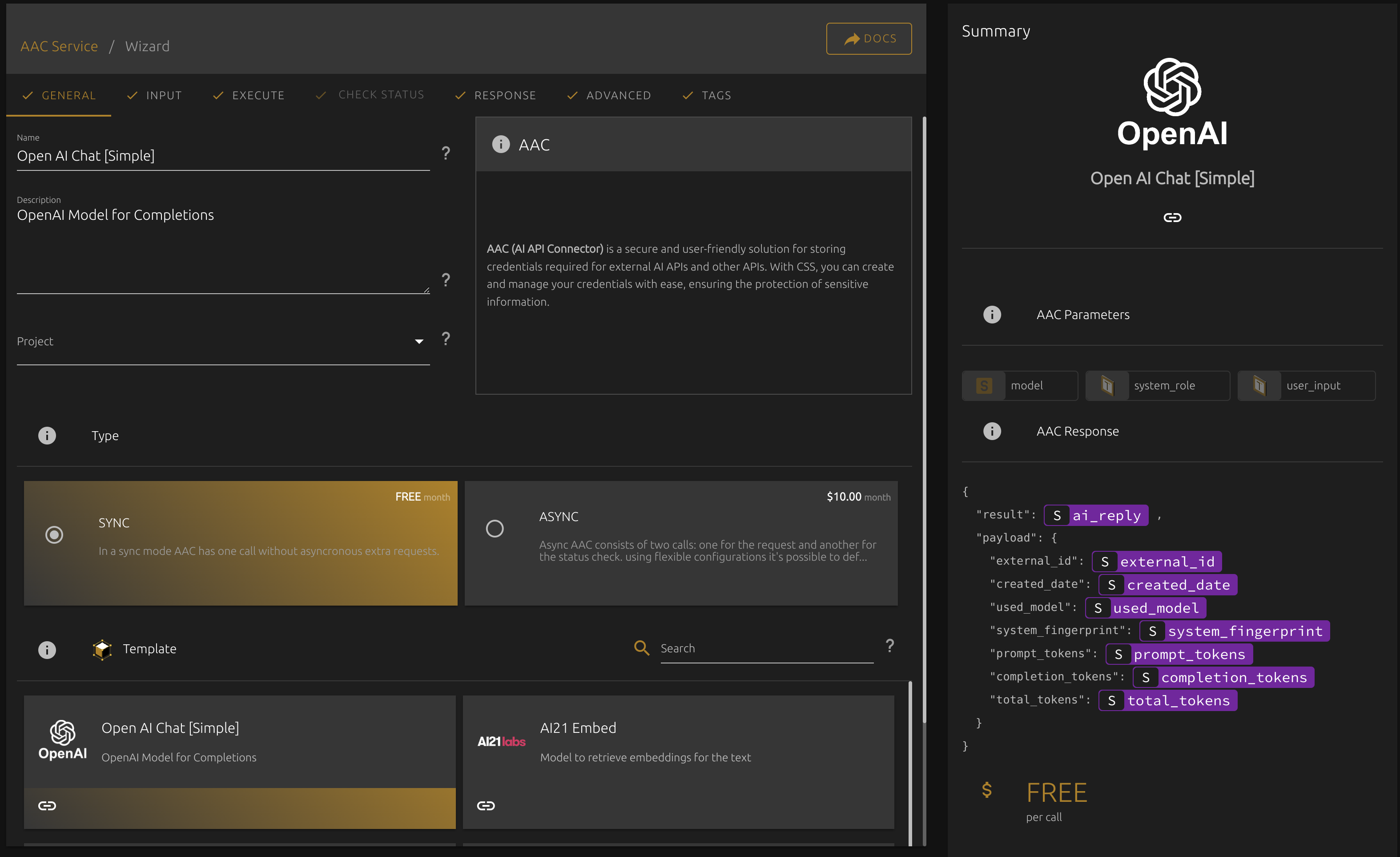
<figure><img src="https://3514947572-files.gitbook.io/~/files/v0/b/gitbook-x-prod.appspot.com/o/spaces%2FA3AV7RUHbrtjhaHwYVxQ%2Fuploads%2Fz9UXZx6dC9h3kNGzHj4m%2Fimage.png?alt=media&amp;token=22eb0bcb-c14f-4774-8088-4201cdaedc36" alt=""><figcaption></figcaption></figure>

### Non-AI Integrations


# AAC Commands


# AIL (AI Lambda)

AI Lambda Service ([AIL](https://cloud4.ai/services/ail.html)) — allows you to use open source models for the specific tasks without own hosting and Pay as you go strategy. You can leverage the most popular AI models from [Hugging Face](https://huggingface.co/) simply providing a target model in your request.

> If you're looking for the specific Model — you can request it via Cloud Console


# CES (Chain Execution)


# API Schema


# KDB (Knowledgebase)

Flexible Storage for RAG and Intellectual Analysis

## Introduction&#x20;

**KnowledgeBase Service** ([KDB](https://cloud4.ai/services/kdb.html)) — is a service that allows you to create your own attachable storage for many integrations using RAG technique.

* **Individual Parsing Strategy with AIL/AAC:** You can define different models for each filetype or specific file to improve data quality.
* **Unlimited DBs Number:** You can create an individual DB for each your customer or product to use it in specific cases.
* **Multiple Attach:** You can attach multiple KDBs to each request (*depending on model limits*) to get more accurate responses.
* **Semantic Search:** You can search across your data empower your engine with AI.

## Usage Scenarios&#x20;

## Structure

<figure><img src="https://3514947572-files.gitbook.io/~/files/v0/b/gitbook-x-prod.appspot.com/o/spaces%2FA3AV7RUHbrtjhaHwYVxQ%2Fuploads%2Fq3jcz6oFiKaQTZg7aJzP%2Fimage.png?alt=media&amp;token=4c741ac5-b184-47e2-84fc-7b0fb4881516" alt=""><figcaption><p>KDB Structure</p></figcaption></figure>

* **File:** You can define different models for each filetype or specific file to improve data quality.
* **Source:** You can create an individual DB for each your customer or product to use it in specific cases.
* **Record:** You can attach multiple KDBs to each request (*depending on model limits*) to get more accurate responses.
* **Embeddings:** You can search across your data.

## Configurations&#x20;

### Embeddings&#x20;

### Injection Prompt

Injection prompt is a prompt that uses to wrap or attach a context from KDB to your actual request.&#x20;

#### Examples

Sdsd


# KDB Commands


# CDB (Context Data Storage)


# PL (Prompt Library)

Prompt Library Service ([PL](https://cloud4.ai/services/pl.html)) — allows effortlessly manage prompts for different AI providers using Roles Based Access (RBAC), parameters and usage tracking.


# PL Commands


# PLPrompt (Prompt)


# Prompt Commands


# IDR (Intellectual Data Retrieval)

Service where it's possible to define a questions for the KDB and get a results. For example a date of birth or anything else using promts, or other C4AI services.


# IDTS (Intellectual Data Transformation Service)


# IDOS (Intellectual Data Observation Service)


# Files


# SJS (Scheduled Job Service )